The example: KOPPIE, an architecture practice in Cape Town
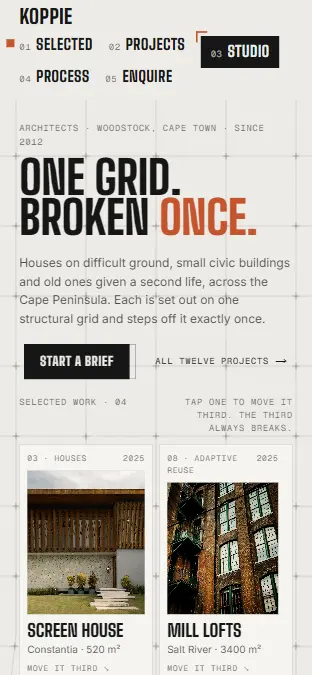
KOPPIE is an architecture practice in Cape Town we invented to show what we build for this trade — every page above works. Broken grid · a visible grid, and one rule that breaks it.
What an architecture website has to do
Clients find an architect through recommendations, then go to the practice’s website to check. They want to see projects like theirs — a house, not a hospital; a renovation, not a tower — and understand how the work proceeds, what it costs and what they will have to decide. A full-bleed slideshow with project names and a “Contact” email answers none of that, and the emails that do arrive say “we are thinking of an extension, how much?”.
An architecture website has a few jobs: lead with the projects that win the work you want, let the archive be filtered by type and scale, show each project as architects think about it — plan, section, numbers — introduce the people, explain the stages and the fees, and turn an enquiry into a brief before the first meeting.
That is what we build for architects, interior designers and practices that win work on their portfolio. KOPPIE, above, is the example: a Cape Town practice whose site sits on a visible grid that one project breaks, whose archive filters by type and scale with every project drawn in plan and section, and whose enquiry page builds a one-page brief and prices the build as you go.
The Royal Institute of British Architects advises clients to look at architects’ portfolios, or visit their finished projects, and to meet a few before deciding.
Source: RIBA, How do I find an architect?
- 01
Lead with the work you want more of
A handful of selected projects up front, chosen to win the next commission, not every job the practice has done.
- 02
An archive by type and scale
Houses, civic buildings, adaptive reuse, each filtered by scale, so a client finds a project like theirs in two taps.
- 03
Projects drawn, not just photographed
Each project with its plan, its section and its numbers — floor area, weeks on site, time to planning approval — because that is how clients compare.
- 04
The people and the places
Who the client will work with, how the practice approaches a job, and a map of where its buildings stand.
- 05
The stages, the decisions and the fee
Each stage from first brief to completion, what the client decides at it and the share of the fee it carries, so nothing in the process is a surprise.
- 06
Enquiries that arrive as briefs
Project type, site, budget band and timing, asked in order, with the likely build cost and fee shown as the client answers.
The example, page by page
01Selected
Selected work on a visible grid. Tap a project and it moves into the place where the grid breaks.
02Projects
The full archive filtered by type and scale, each project drawn in plan and section, with its facts.
03Studio
The people, the practice’s approach, and a map of the peninsula with its buildings pinned.
04Process
The stages scrubbed one by one, with what the client decides and what each stage delivers.
05Enquire
A brief builder that turns an enquiry into a one-page brief, with the build cost and fee ranged as you go.
Briefs, not cold emails
Built to bring in the projects the studio wants, arriving as briefs rather than cold emails. A client who has filtered the work and set a budget band has, in effect, already chosen.
How we build it
- Days 1–3
Your archive
The projects to lead with, their photographs, drawings and numbers, and how your fees work.
- Days 4–11
The pages
The grid, the one rule that breaks it, and every page, with your plans and sections redrawn to one style.
- Days 12–15
Live
The archive CMS and the brief builder connected, tested, and launched.
What an architecture website costs
$3,800–$5,500
12–15 days to live · fixed price, agreed before we start · branding included
What moves the price
- How many projects in the archive
- Plans and sections redrawn to one style
- A brief builder with cost guidance
- An archive your team publishes to
After launch, hosting, uptime, security and monthly reporting run from $250 a month: a monthly retainer, never a contract term.
Questions we get asked
How much does an architecture website cost?+
Ours run from $3,800 to $5,500, fixed and agreed before we start. The range is set by how many projects go into the archive, whether we redraw plans and sections, and how the brief builder guides cost.
How long does it take?+
Twelve to fifteen days from the first call to live. Gathering drawings and photographs is the slow part, so we agree the lead projects in the first call.
Can we add projects ourselves?+
Yes. The archive runs on a CMS your team publishes to: photographs, drawings, the facts and the text, in the same layout every time.
Should we show budgets or fees?+
Showing the fee as a share of the build cost, and the build cost as a range for the brief, sets expectations before the first meeting and saves both sides a conversation. The brief builder shows ranges, never a quote.
Do you redraw our plans?+
If you want one style across the archive, yes: we redraw plans and sections from your drawings into a single line weight and palette that suits the site.
Is KOPPIE a real practice?+
No. KOPPIE is a Cape Town practice we invented to show what we build for architects. Every page works as a design you can try; the archive CMS and the brief builder are what we connect to your practice at build.